Canadian bookkeeping and taxes · in Spanish
Canadian bookkeeping and taxes, explained in Spanish.
Akaza Benitez is an app for Spanish speakers in Canada. Record what you earn and spend, see an estimate of the tax you owe, and learn what the CRA expects from you. The app is in Spanish, and it covers a household, a self-employed business and a corporation.
- No account or password
- Works offline
- Your data stays on your device
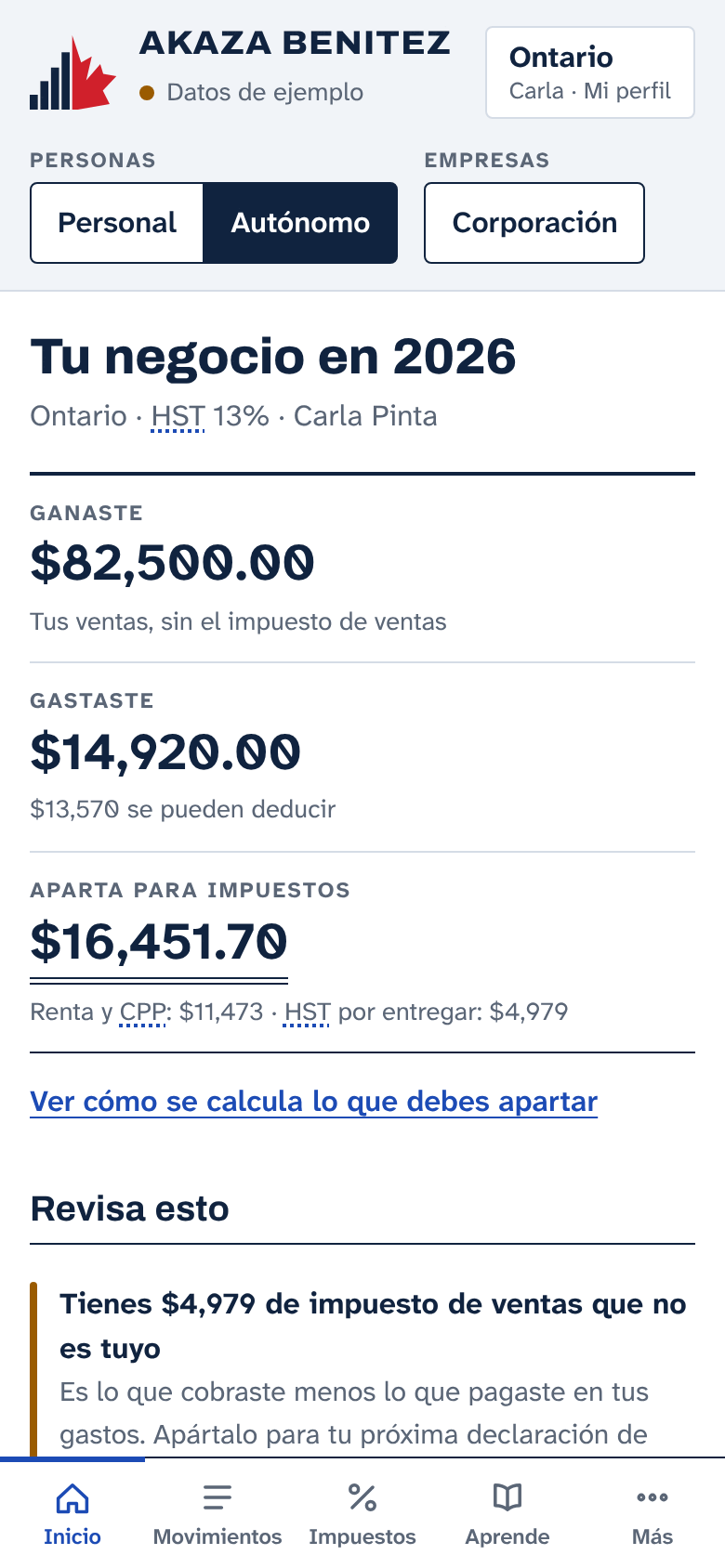
Canadian paperwork comes in English. The app explains it in Spanish.
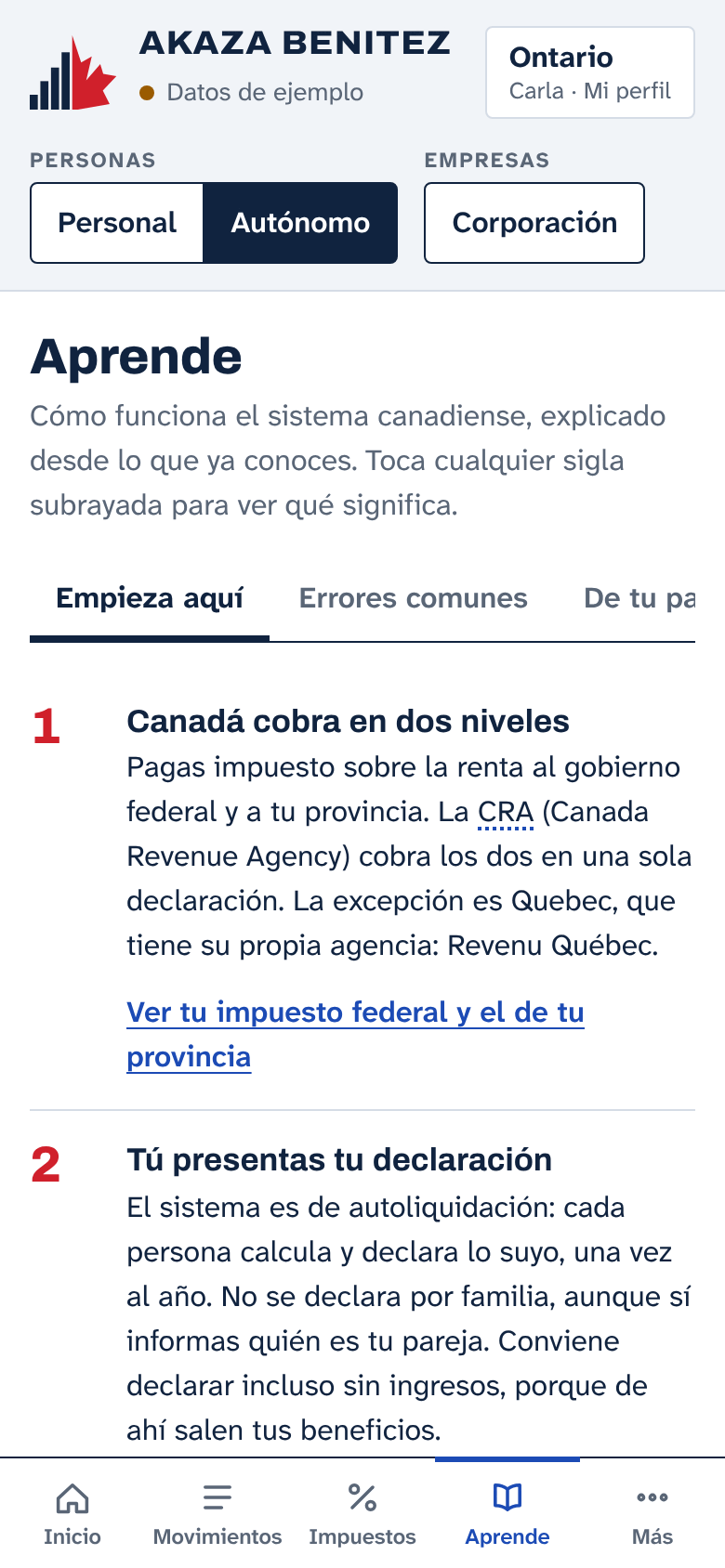
Every acronym and form appears under its official name, exactly as printed, next to a plain explanation.
- T4Statement of Remuneration Paid
- Tu salario del año y lo que te retuvieron.Your pay for the year and what was withheld from it.
- GST/HSTGoods and Services Tax / Harmonized Sales Tax
- El impuesto de ventas de Canadá, parecido al IVA. GST es el 5% federal. HST es el GST y el impuesto de la provincia cobrados juntos, en una sola tasa.Canada’s sales tax, similar to the IVA charged in Latin America. GST is the 5% federal tax. HST is the GST and the provincial tax charged together, at a single rate.
- NOANotice of Assessment
- La respuesta de la CRA a tu declaración. Confirma tu reembolso o tu saldo y te dice tu cupo de RRSP.The CRA’s reply to your return. It confirms your refund or your balance and tells you your RRSP room.
- CRACanada Revenue Agency
- La agencia federal de impuestos. Recibe tu declaración, cobra los impuestos y paga beneficios. En francés se llama ARC.The federal tax agency. It receives your return, collects taxes and pays benefits. In French it is called ARC.
The app covers 27 acronyms, 45 terms and the codes on Canadian tax forms. One tap opens any of them.
One set of books for each situation
Choose yours when you start. You can keep all three at once and switch between them with a tap.
FormT1
Personal
Your household and your personal return.
- A budget: money in and money out each month
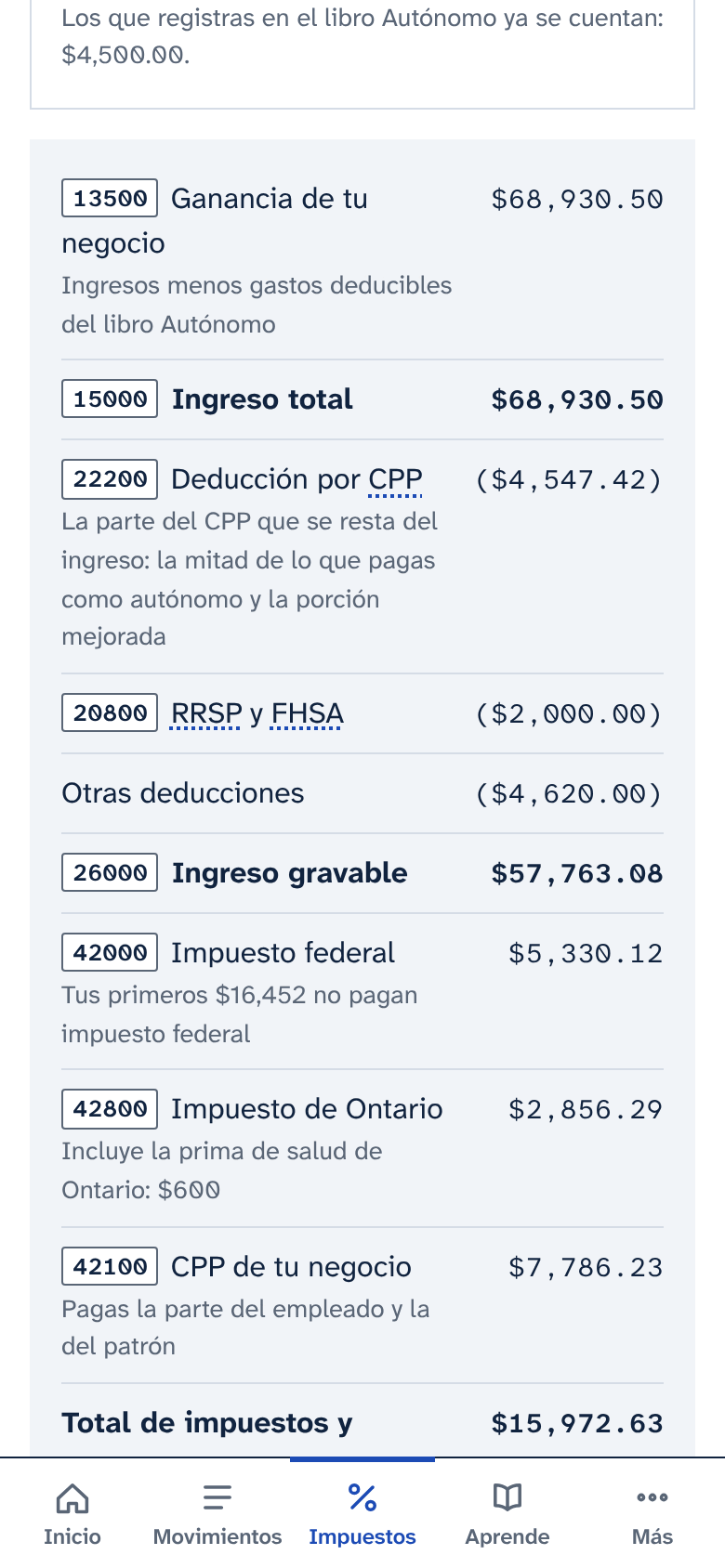
- Your estimated federal and provincial tax, line by line
- A summary of what to gather before you file
FormT2125
Self-employed
Your unincorporated business.
- Income and expenses in the categories of form T2125
- GST/HST: what you collected, what you paid and what you owe
- How much to set aside for tax and CPP as you get paid
FormT2
Corporation
Your incorporated company (Inc., Ltd., Corp.).
- Accounts mapped to the GIFI codes used on the T2 return
- An estimate of corporate tax
- What an employee costs with CPP and EI
What is inside
The same sections in all three sets of books, each with the content that applies.
- Inicio · Home
- Your year at a glance: money in, money out and what needs a second look.
- Movimientos · Entries
- Record income or an expense in seconds. Each category is already tied to the form line where it is reported.
- Impuestos · Taxes
- Your estimated tax for your province, with the detail behind every figure. Includes a sales tax calculator.
- Reportes · Reports
- Results by month, quarter or year, and a summary for your return.
- Fechas · Dates
- What comes due in the coming months for your situation, to tick off as you go.
- Códigos · Codes
- T1 and T2125 lines, GIFI codes, slips such as the T4 and the most common forms, with search.
- Aprende · Learn
- Eight short lessons, the most common mistakes, a glossary and a checklist for newcomers.
- Herramientas · Tools
- PDF invoices with the right tax, a mileage log and a home office calculation.
Install it on your phone
It installs from this page and gets its own icon, like any other app. It does not go through an app store.
Done. Look for it on your home screen.
If you opened this link from Facebook, Instagram or another app, open it in Safari or Chrome first. Installing works from there.
iPhone and iPad
- Tap Open the app on this page, in Safari.
- Tap Share. It is under the three dots next to the address bar, or it is the square with an upward arrow.
- Choose Add to Home Screen.
- Keep Open as Web App switched on, then tap Add.
Install it before you start recording. On an iPhone, the installed app keeps its data separate from Safari.
Android
- Tap Open the app on this page, in Chrome.
- Tap Instalar on the notice at the top, inside the app.
- If you do not see it, open the three-dot menu and choose Add to Home screen or Install app.
Computer
- Open the app in Chrome or Edge.
- Click the install icon at the end of the address bar.
- Choose Install. The app is added to your desktop or Start menu.
Want it on your phone? Point the camera at this code.
Your numbers stay yours
No account
There is no username or password to create. Open the app and start.
On your device
What you record is stored on your phone or computer. It is not sent to any server.
No SIN
The app never asks for your Social Insurance Number or your banking passwords.
With a backup
Download a copy whenever you like. Use it to recover your books or move them to another phone.
Save a backup from time to time. If you delete the app or clear the browser data, that copy is all that remains.
Frequently asked questions
Does it replace an accountant?
No. It helps you stay organized and learn. It does not file returns with the CRA or replace professional advice.
Is it on Google Play or the App Store?
Not yet. It installs from this page and behaves like any other app: its own icon, and it works offline.
Which year are the figures for?
2026. They were verified on November 11, 2026 at canada.ca, revenuquebec.ca and alberta.ca, and the app shows that date.
Does it work in my province?
Yes. It includes the rates for all ten provinces and three territories. In Quebec it calculates with QST and QPP.
What language is it in?
Spanish. Official terms appear in English, as they do on your paperwork, each with an explanation.
What if I change phones?
Download a backup on the old phone and restore it on the new one. Your books arrive complete.
Do I need an internet connection?
Only to open it the first time. After that it works offline.